A car diagnostic scanner can help identify why a warning light is on, but basic code readers and advanced scan tools serve different needs. I rank the Innova 5610 as the best overall for buyers who want bidirectional controls and deeper diagnostics, while the Innova 5210 adds battery testing and oil reset functions for routine ownership tasks. For straightforward check-engine codes, the ANCEL AD310 keeps things simple and affordable. The main tradeoff is between low cost and basic engine-code access versus spending more for live data, resets, or vehicle-specific functions. Read on for how I rank all nine scanners and which type of buyer each one fits.

Get business pricing on garage and car supplies
- Business-only prices and quantity discounts
- Tax-exempt purchasing
- Multiple users, one account, clear invoices
Complete the kit


Key Takeaways
- The Innova 5610 leads on diagnostic depth: bidirectional controls make it better suited to active troubleshooting than simple code readers.
- The Innova 5210 fills a practical middle ground: battery testing and oil reset functions add useful maintenance support without making it the most advanced pick.
- The ANCEL AD310 prioritizes simplicity and price: it suits basic engine-code checks, while the FOXWELL NT301 is a better fit when live data matters.
- Not every scanner covers every system: most picks here focus on OBD-II engine diagnostics, so buyers should verify ABS, airbag, transmission, and service reset coverage before purchase.
- Vehicle compatibility is a deciding factor: the V318 is described for gasoline vehicles, while broad OBD-II compatibility still does not guarantee access to every make-specific function.
| Launch G700 OBD2 Scanner, Car Code Reader with Live Data & I/M Check |  | Best for Straightforward Live Diagnostics | Brand: LAUNCH | Model: Creader G700 | Vehicle coverage: Most 12V gasoline and diesel vehicles from 1996 onward | VIEW LATEST PRICE | See Our Full Breakdown |
| MOTOPOWER MP69033 Car OBD2 Scanner Code Reader Engine Fault Diagnostic Tool |  | Best Budget Basic Code Reader | Supported vehicle years: 1996 and newer | Protocols: 9 protocols | Display: 2.8-inch backlit LCD | VIEW LATEST PRICE | See Our Full Breakdown |
| Innova 5210 OBD2 Scanner & Engine Code Reader, Battery Tester, Live Data, Oil Reset, Car Diagnostic Tool for Most Vehicles, Bluetooth Compatible with America’s Top Car Repair App |  | Best for Battery and Engine Checks | Brand: Innova | Model: 5210 | Vehicle coverage: Most vehicles from 1996 onward | VIEW LATEST PRICE | See Our Full Breakdown |
| ANCEL AD310 Classic Enhanced Universal OBD II Scanner Car Engine Fault Code Reader |  | Best Compact Grab-and-Go Scanner | Supported protocols: KWP2000, J1850 VPW, ISO9141, J1850 PWM, and CAN | Vehicle compatibility: 1996+ US; 2000+ EU and Asian cars, light trucks, and SUVs | Dimensions: 8.9 x 6.9 x 1.4 inches | VIEW LATEST PRICE | See Our Full Breakdown |
| Innova 5610 OBD2 Bidirectional Scan Tool | 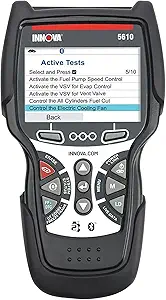 | Best for Advanced DIY Diagnostics | Brand: Innova | Model: 5610 | Vehicle coverage: Most 1996–2023 vehicles; some functions limited to select makes and models | VIEW LATEST PRICE | See Our Full Breakdown |
| V318 OBD2 Scanner Diagnostic Tool |  | Best for Battery Checks | Compatibility: Most 12V OBDII/EOBD gasoline vehicles | Display: Color screen | Power: Plug and play; no extra batteries required | VIEW LATEST PRICE | See Our Full Breakdown |
| Autel MS309 OBD2 Scanner Universal Car Engine Fault Code Reader |  | Best for Freeze-Frame Data | Compatibility: Vehicles from 1996 onward in the US market | Connection: OBDII 16-pin port | Code functions: Retrieve and clear generic and manufacturer-specific trouble codes | VIEW LATEST PRICE | See Our Full Breakdown |
| FOXWELL NT301 OBD2 Scanner Live Data Diagnostic Code Reader Tool |  | Best for Live-Data Analysis | Display: 2.8-inch color screen | Compatibility: Most 1996+ gasoline cars, light trucks, SUVs, many 2000+ European and Asian models, and 12V diesel vehicles | Protocols: KWP2000, J1850 VPW, ISO9141, J1850 PWM, CAN | VIEW LATEST PRICE | See Our Full Breakdown |
| ANCEL AD410 Enhanced OBD2 Scanner |  | Best for Beginners | Display: 2.4-inch color screen | Compatibility: 1996+ OBD2 vehicles | Protocols: CAN, ISO9141, KWP2000, J1850 VPW, J1850 PWM | VIEW LATEST PRICE | See Our Full Breakdown |
More Details on Our Top Picks
Launch G700 OBD2 Scanner, Car Code Reader with Live Data & I/M Check
The Launch G700 suits drivers who want more than a basic check-engine code reader but prefer a self-contained device. Its live data and emissions readiness checks can help narrow down an engine issue and show whether a vehicle is prepared for an emissions test. Dedicated access to common functions keeps routine checks simple without a phone or app. Compared with the MOTOPOWER MP69033, the G700 emphasizes quick access and U.S.-based support; both remain limited to OBDII engine diagnostics. That boundary matters: it does not scan ABS or SRS systems, and it is not for pure EVs or heavy-duty trucks. Choose it for accessible engine checks on a compatible 12V vehicle, rather than broader repair work.
Pros:- Plug-and-play operation without an app or separate device
- Combines code reading, live data, and emissions readiness checks
- Dedicated buttons provide quick access to common functions
- Includes U.S.-based customer and technical support
Cons:- Does not provide full-system diagnostics such as ABS or SRS
- Not compatible with pure electric vehicles or heavy-duty trucks
- Limited to supported 12V gasoline and diesel vehicles
Best for: Drivers of 1996-and-newer compatible 12V cars who want live engine data and readiness checks on a dedicated handheld scanner
Not ideal for: Owners of pure electric vehicles, heavy-duty trucks, or vehicles needing ABS, SRS, or other full-system diagnostics
- Brand:LAUNCH
- Model:Creader G700
- Vehicle coverage:Most 12V gasoline and diesel vehicles from 1996 onward
- Protocols:Common OBD2/EOBD protocols
- Functions:Code reading, live data, and emissions readiness checks
- Included components:Creader G700 and user manual
- Warranty:2 years
Our verdict“Pick the Launch G700 if you want a standalone scanner for routine engine checks and live data on a compatible 12V vehicle.”
MOTOPOWER MP69033 Car OBD2 Scanner Code Reader Engine Fault Diagnostic Tool
The MOTOPOWER MP69033 is a practical pick for buyers whose main task is checking an engine warning light and reading or clearing OBDII codes. Its backlit 2.8-inch display and simple buttons keep the process on the scanner, while vehicle-port power means there are no batteries to manage. It supports nine protocols and six listed languages, giving it useful breadth for a basic tool. Against the ANCEL AD310, it offers a stated language selection and similar plug-in simplicity, but neither is a full-system scanner. The MP69033 cannot handle ABS, airbag, or oil service light codes, and live data requires the engine to be running. It makes sense for routine engine checks, not deeper diagnostics.
Pros:- Reads and clears engine fault codes and displays live data
- Backlit 2.8-inch LCD and simple button interface
- Vehicle OBDII port supplies power, so no batteries are needed
- Supports nine protocols and six listed languages
Cons:- Limited to OBDII systems and cannot read ABS, airbag, or oil service codes
- Live data requires the engine to be running
- Requires a physical connection to the vehicle’s OBDII port
Best for: Budget-minded owners of 1996-and-newer OBDII cars who want a simple screen-based reader for engine codes
Not ideal for: Drivers who need ABS, airbag, oil service, or non-OBDII diagnostics, or who want live data with the engine off
- Supported vehicle years:1996 and newer
- Protocols:9 protocols
- Display:2.8-inch backlit LCD
- Languages:English, German, Dutch, Spanish, French, and Italian
- Cable length:2.5 feet
- Power source:Vehicle OBDII port
- Supported systems:OBDII systems; not ABS, airbag, or oil service light
Our verdict“Choose the MOTOPOWER MP69033 for affordable, direct engine-code checks when you do not need system-level coverage.”
Innova 5210 OBD2 Scanner & Engine Code Reader, Battery Tester, Live Data, Oil Reset, Car Diagnostic Tool for Most Vehicles, Bluetooth Compatible with America’s Top Car Repair App
The Innova 5210 earns its place for combining engine diagnostics with a battery tester, so a driver investigating a hard start can check more than the engine codes alone. Live data, smog readiness, and an oil reset add useful maintenance functions, while its free repair app offers guidance without a subscription. That gives it a broader everyday role than the MOTOPOWER MP69033, which is focused on OBDII system checks. The tradeoff is that some functions depend on vehicle make and model, and ABS coverage can vary; the available description does not establish universal access. Its ignition-on requirement for accurate readings also calls for following the setup instructions. This is a useful middle ground for owners who want a few extra checks without stepping up to the Innova 5610’s bidirectional controls.
Pros:- Combines engine code reading with battery health testing
- Provides live data and smog readiness checks
- Includes oil reset functionality
- Free repair app guidance without subscription fees
Cons:- ABS code coverage varies by vehicle
- Some functions may not work across all makes and models
- Accurate readings require the vehicle ignition to be on
Best for: DIY car owners who want one tool for engine codes, battery health, and basic maintenance checks, plus free app guidance
Not ideal for: Buyers who need guaranteed ABS coverage across vehicles or advanced bidirectional controls
- Brand:Innova
- Model:5210
- Vehicle coverage:Most vehicles from 1996 onward
- Functions:Engine and ABS code reading, battery testing, live data, oil reset, and smog readiness
- App:Bluetooth compatible; free repair app with no subscription fees
- Included components:Code reader with attached OBD2 cable and quick start guide
- UPC:042173052103
Our verdict“Choose the Innova 5210 if battery checks and routine engine diagnostics matter more than advanced bidirectional control.”
ANCEL AD310 Classic Enhanced Universal OBD II Scanner Car Engine Fault Code Reader
The ANCEL AD310 is a lightweight, straightforward choice for keeping an engine-code reader in the car or using one at home without app setup. It reads and clears engine trouble codes and shows live data and freeze frames, which can help owners see what was happening when a fault appeared. Its support for the listed OBDII protocols and broad stated regional vehicle coverage make it a simple alternative to the Innova 5210, which adds battery testing, oil reset, and app guidance. The AD310 keeps things more basic: it only covers emission-related engine diagnostics and cannot read ABS, SRS, or transmission faults. That makes it a sensible portable tool for check-engine issues, but a poor fit when the warning light points beyond the engine system.
Pros:- Supports the listed OBDII protocols
- Displays live data and freeze frames alongside engine code functions
- Compact 12-ounce design is easy to store or carry
- Powered through the vehicle’s OBDII connector
Cons:- Limited to emission-related engine diagnostics
- Cannot diagnose ABS, SRS, or transmission issues
- Does not support OBDI vehicles, even with adapters
Best for: Drivers who want a light, self-contained scanner for engine codes, freeze-frame records, and live data on a compatible OBDII vehicle
Not ideal for: Owners diagnosing ABS, SRS, transmission, non-emission engine faults, or pre-OBDII vehicles
- Supported protocols:KWP2000, J1850 VPW, ISO9141, J1850 PWM, and CAN
- Vehicle compatibility:1996+ US; 2000+ EU and Asian cars, light trucks, and SUVs
- Dimensions:8.9 x 6.9 x 1.4 inches
- Weight:12 ounces
- Power source:OBDII data link connector
- Cable length:2.5 feet
- Functions:Engine code reading and clearing, live data, and freeze frames
Our verdict“Pick the ANCEL AD310 if portability and uncomplicated engine-code checks matter more than extra systems or maintenance features.”
Innova 5610 OBD2 Bidirectional Scan Tool
The Innova 5610 is the most advanced option in this batch for owners who want bidirectional controls alongside live diagnostics and reset procedures. Command controls can make it more useful for active troubleshooting than the Innova 5210, which focuses on battery testing and routine maintenance functions. It also pairs with the RepairSolutions2 app for wireless diagnostics and includes free updates and ASE-certified support. These extras make it a better match for confident DIY users willing to check whether a function is supported on their specific vehicle. Coverage is limited to select makes and models, and app features need an internet connection, so it is not a universal scanner. Buyers who only need to read a check-engine code may find a simpler tool easier to justify.
Pros:- Provides bidirectional command controls and reset procedures
- Shows real-time vehicle diagnostics
- Supports wireless diagnostics through the RepairSolutions2 app
- Includes free updates and ASE-certified support
Cons:- Vehicle coverage is limited to select makes and models
- App features require an internet connection
- More functionality than needed for basic engine-code checks
Best for: Experienced DIY mechanics who want bidirectional commands and reset procedures on a supported 1996–2023 vehicle
Not ideal for: Drivers seeking a universal scanner, app-independent operation, or only occasional basic check-engine code reading
- Brand:Innova
- Model:5610
- Vehicle coverage:Most 1996–2023 vehicles; some functions limited to select makes and models
- Functions:Live diagnostics, reset procedures, and bidirectional command controls
- App:RepairSolutions2 wireless diagnostics; internet required for app features
- Weight:1.3 pounds
- Included components:Code reader with protective boot, manual, OBD2 cable, soft pouch, and USB cable
- Support and updates:ASE-certified support and free updates
Our verdict“Choose the Innova 5610 if your supported vehicle and repair needs justify bidirectional controls and advanced reset functions.”
V318 OBD2 Scanner Diagnostic Tool
The V318 earns a place for drivers who want a simple handheld reader with a battery voltage check alongside basic engine diagnostics. Its plug-and-play setup and color screen make it a straightforward choice for checking a warning light or viewing live data without a phone app. Compared with the Autel MS309, it adds the stated voltage test, while the Autel lists freeze-frame data and vehicle information. The V318 is limited to 12V gasoline vehicles that support OBDII/EOBD, so buyers should confirm compatibility before ordering. Its feature set suits routine home checks, but it lacks the advanced system coverage a professional workshop may need.
Pros:- Plug-and-play operation with no extra batteries required
- Checks battery voltage as well as engine codes
- Shows live data on a color screen
- Compact handheld design is easy to store in a car
Cons:- Limited to compatible 12V gasoline vehicles
- Basic diagnostic coverage may not meet workshop needs
Best for: DIY owners of compatible 12V gasoline cars who want a compact code reader and a quick battery voltage check.
Not ideal for: Owners of diesel or non-OBDII vehicles, and professional technicians who need advanced system diagnostics.
- Compatibility:Most 12V OBDII/EOBD gasoline vehicles
- Display:Color screen
- Power:Plug and play; no extra batteries required
- Connectivity:OBD2 16-pin port
- Diagnostics:Read and clear codes, DTC lookup, live data, I/M readiness
- Additional check:Battery voltage test
- Design:Lightweight handheld
Our verdict“Choose the V318 if you want a portable basic scanner with a battery voltage check for a compatible gasoline car.”
Autel MS309 OBD2 Scanner Universal Car Engine Fault Code Reader
The MS309 is a good fit when a low-cost scanner needs to show more than a code number: it can display DTC meanings and freeze-frame data, which captures vehicle information around the time a fault appeared. That gives DIY owners more context than the V318’s listed core features, though the V318 adds a battery voltage test. The Autel also checks I/M readiness, useful before an emissions inspection. Its limits are clear: it handles basic OBDII diagnostics, not service functions such as TPMS, and FCA vehicles made after 2017 are unsupported according to the product data. Buyers with newer FCA vehicles or needs beyond engine diagnostics should look elsewhere.
Pros:- Displays DTC meanings and freeze-frame data
- Checks I/M readiness for smog preparation
- Plug-and-play connection through the OBDII port
- Includes a 12-month warranty and lifetime technical support
Cons:- Limited to basic OBDII functions
- Does not support TPMS or other service functions
- Cannot access codes for FCA vehicles manufactured after 2017
Best for: DIY owners of 1996-or-newer US-market vehicles who want code definitions, freeze-frame context, and an emissions readiness check.
Not ideal for: Owners of FCA vehicles made after 2017 or drivers seeking TPMS, service resets, or advanced system diagnostics.
- Compatibility:Vehicles from 1996 onward in the US market
- Connection:OBDII 16-pin port
- Code functions:Retrieve and clear generic and manufacturer-specific trouble codes
- Data:DTC meanings, freeze-frame data, and vehicle information
- Readiness:I/M readiness check
- Warranty:12 months
- Support:Lifetime free technical support
Our verdict“Pick the MS309 if freeze-frame details and code definitions matter more to you than battery testing or broader service functions.”
FOXWELL NT301 OBD2 Scanner Live Data Diagnostic Code Reader Tool
The NT301 stands out for owners who want to inspect engine behavior, not just retrieve a fault code. Its live-data graphing, EVAP and O2 sensor tests, and broad protocol support give it more diagnostic detail than the simpler Autel MS309, which emphasizes code meanings and freeze-frame data. That extra visibility can help a DIYer narrow down a problem before arranging repairs, but this remains an engine and emissions focused OBD2 tool, not a substitute for advanced repair equipment. The 2.8-inch color screen keeps information on the device, though it may be harder to read in bright sunlight. Check vehicle fit, particularly for diesel or non-US models.
Pros:- Graphs live data to help track changing engine readings
- Includes I/M readiness, EVAP, and O2 sensor testing
- Supports several common OBD2 protocols
- Lifetime free updates are listed
Cons:- Limited to basic diagnostic functions despite its added test modes
- Small screen may be difficult to read in bright sunlight
- Requires an OBD2-compliant vehicle
Best for: DIY owners of supported 1996-and-newer cars who want graphable live data and emissions tests to investigate engine warnings.
Not ideal for: Technicians who need advanced repair functions, or buyers whose vehicles are outside the stated OBD2 compatibility range.
- Display:2.8-inch color screen
- Compatibility:Most 1996+ gasoline cars, light trucks, SUVs, many 2000+ European and Asian models, and 12V diesel vehicles
- Protocols:KWP2000, J1850 VPW, ISO9141, J1850 PWM, CAN
- Live data:Graphing
- Tests:I/M readiness, EVAP, and O2 sensor testing
- Code functions:Read and clear codes
- Updates:Lifetime free updates
- Warranty:1-year seller assurance
Our verdict“Choose the NT301 if you want more live-data and emissions analysis than a basic code reader offers, and your vehicle is supported.”
ANCEL AD410 Enhanced OBD2 Scanner
The AD410 is an approachable pick for drivers who want an onboard scanner that works without an app or separate power source. It reads and clears engine codes, displays live data, and checks emissions readiness, giving beginners a practical set of tools for understanding a check-engine light. Compared with the FOXWELL NT301, the AD410 has a smaller 2.4-inch display and its listed feature set does not include graphing or EVAP and O2 sensor tests. In return, it keeps the setup simple, with multilingual support and power from the car’s OBD2 port. Its scope stays within engine and emission-related diagnostics; it cannot scan ABS or transmission systems.
Pros:- Operates without a smartphone app
- Powered directly by the vehicle’s OBD2 port
- Reads and clears engine codes, displays live data, and checks readiness
- Supports major OBD2 protocols and multiple languages
Cons:- Does not support ABS or transmission diagnostics
- No Bluetooth or wireless connection
- Requires a vehicle with an OBD2 port
Best for: First-time scanner buyers with a 1996-or-newer OBD2 vehicle who want straightforward engine-code and readiness checks without a phone.
Not ideal for: Owners who need ABS or transmission diagnostics, wireless connectivity, or more detailed live-data tools.
- Display:2.4-inch color screen
- Compatibility:1996+ OBD2 vehicles
- Protocols:CAN, ISO9141, KWP2000, J1850 VPW, J1850 PWM
- Power:Powered directly from the vehicle’s OBD2 port
- Diagnostics:Read and clear engine codes, view live data, check system readiness
- Languages:Multilingual support
- Updates:Free software updates
Our verdict“The AD410 suits beginners who want simple, app-free engine diagnostics and do not need ABS or transmission coverage.”
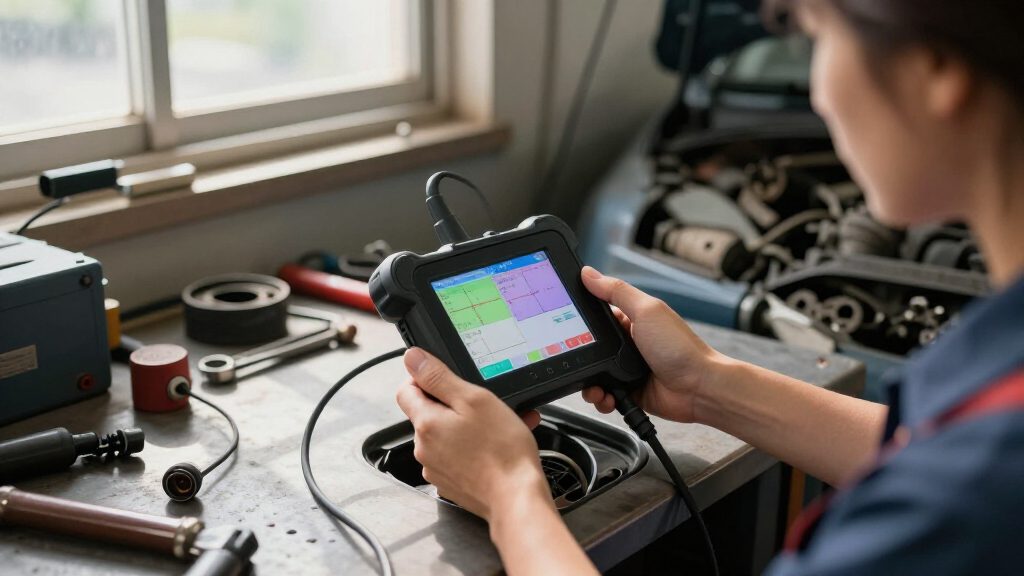
How We Picked
I ranked these scanners by how well they help a buyer move from a warning light to a useful next step. I weighed diagnostic depth, including live data, bidirectional controls, battery checks, and maintenance functions, alongside ease of use, vehicle coverage, and the value those functions add for the intended buyer. A scanner that supports more functions can save time, but only when those functions match the owner’s vehicle and repair plans.
The Innova 5610 ranks first for its advanced control capabilities, while the Innova 5210 follows as a more maintenance-focused choice. The FOXWELL NT301 and Launch G700 offer a stronger case for buyers who want live data without stepping up to the most specialized tool. Simpler readers such as the ANCEL AD310, Autel MS309, and MOTOPOWER MP69033 rank lower for narrower diagnostic scope, though that simplicity can be the right tradeoff for occasional code checks. I treated product names and listed functions as starting points; buyers should confirm exact vehicle and system support before ordering.
Factors to Consider When Choosing Car Diagnostic Scanner
Before choosing a scanner, I would match its functions to the decisions you expect to make after a warning light appears. A low-cost reader may tell you which engine code is stored, while a more capable unit can show changing sensor data or run supported tests. The right choice depends on your vehicle, your comfort interpreting data, and whether you plan to do more than read and clear codes.
Match the Scanner to the Systems You Need
OBD-II compatibility usually means access to standardized emissions and engine diagnostics, not every module in the car. ABS, airbag, transmission, and body systems may need a scanner with explicit support for those systems and your vehicle make. A common mistake is assuming that “all systems” or “universal” means every function works on every model year. Check the manufacturer’s coverage information using your exact year, make, model, and engine. If your goal is only to investigate a check-engine light, broad module coverage may add cost without helping your usual task. If you maintain several vehicles, wider vehicle coverage can matter more than a long feature list.
Decide Whether Live Data Will Change Your Next Step
A stored code points to a detected condition; it does not automatically identify the failed part. Live data can show values such as engine speed or sensor readings while the engine runs, which may help distinguish a persistent fault from a clue that needs more diagnosis. It is most useful when you know which readings relate to the symptom or can follow a repair reference. For a one-time code lookup, live data may be more complexity than you need. Look for clear display and graphing options if you expect to compare readings over time. Avoid replacing parts based on a code alone, since the same code can have several causes.
Pay More for Active Tests Only When You Can Use Them
Bidirectional control lets a compatible scanner send commands to vehicle components, rather than only read information from them. That can help with targeted troubleshooting, but supported tests vary by car and system. Buyers sometimes pay for this capability expecting it to activate every component or perform every service procedure; that is not guaranteed. Check the supported functions for your specific vehicle before treating the feature as a reason to upgrade. If you are learning basic diagnostics, a reader with straightforward code and live-data functions may be easier to use well. Advanced controls make more sense for experienced DIY mechanics or owners who regularly diagnose faults.
Check Maintenance Functions and Their Limits
Oil reset, battery testing, and readiness checks can make a scanner useful between repairs, but these features do different jobs. An oil reset clears a service reminder on supported vehicles; it does not replace the maintenance itself. A battery voltage reading can flag a concern, but it is not the same as a full load test or a professional battery diagnosis. Readiness checks can show whether emissions monitors are prepared, which matters after repairs or before an emissions inspection. Confirm which functions are supported for your vehicle and whether any require an app, account, or extra setup. Choose features you will use often enough to justify paying for them.
Choose a Format You Will Actually Use
Handheld readers are ready to plug into the diagnostic port and often suit owners who want a self-contained tool. Bluetooth-compatible options can pair with a phone app, which may provide a larger screen or additional repair information, but app features and compatibility can vary. Consider where you will use the scanner: a small tool is easy to store, while a larger display may be easier to read under the dash. Check whether the cable reaches comfortably and whether the screen is readable in the conditions where you expect to diagnose a car. Do not assume a Bluetooth label means every phone or app feature is included at no extra cost. A simple interface can be more valuable than advanced functions that are difficult to access.
Treat Code Clearing as the Last Step
Clearing a fault code can turn off a warning temporarily, but it does not repair the cause. It can also erase information that would help diagnose an intermittent problem, so record the code and relevant details first. After a repair, a scanner can help check whether the code returns and whether readiness monitors have completed. If a warning light comes back, repeated clearing is unlikely to resolve the underlying issue. Buyers should also know that a basic scanner may not explain the repair procedure or confirm that a replacement part is needed. Use the scanner to gather evidence, then pair that information with service documentation or qualified help when the diagnosis is unclear.
Frequently Asked Questions
Will these scanners diagnose ABS or airbag warning lights?
Do not assume so. The listed functions for most of these models focus on engine and OBD-II diagnostics, and a check-engine reader may not access ABS or airbag modules. Confirm explicit support for the system and your exact vehicle before buying. If those warning lights are your main concern, choose a scanner whose coverage list names the relevant module. Clearing a code without diagnosing a safety-system fault can leave the underlying issue unresolved.
Can I use a basic scanner to pass an emissions inspection?
A scanner can show emissions readiness status, but it cannot make an unready vehicle pass. After a repair or battery disconnect, monitors may need normal driving conditions to complete. Check readiness before the inspection and avoid clearing codes just beforehand, since that can reset monitor status. A code reader may also reveal a stored emissions fault that needs repair. Requirements and inspection procedures vary by location, so use the scanner as a diagnostic aid rather than a pass guarantee.
Is a scanner with live data worth the extra cost for occasional use?
It depends on whether you want to diagnose beyond the code itself. Live data can help you see how sensor readings change, which is useful when a fault is intermittent or the code points to several possible causes. For an occasional check-engine lookup, a simpler reader may answer the immediate question at lower cost. If you plan to maintain a car or compare readings before and after repairs, live data can make the added capability worthwhile. You will get more from it if you can interpret the readings using reliable repair information.
Does clearing a check-engine code fix the problem?
No. Clearing removes the stored code and may switch off the warning until the vehicle detects the fault again. Save the code and any freeze-frame information before clearing it, since that evidence can help locate an intermittent problem. If the cause remains, the light may return or the vehicle may continue to run poorly. After a repair, clearing can be part of checking the result, but it is not a substitute for the repair itself. Readiness monitors may also need time and driving cycles to complete again.
What should I verify before ordering a scanner for my car?
Check your vehicle’s year, make, model, engine, and the specific systems you want to scan against the manufacturer’s compatibility information. Confirm whether the functions you need, such as live data, battery testing, or service resets, are supported on that vehicle rather than merely listed as general features. If you are considering Bluetooth, check phone and app requirements and whether any services have separate costs. Older vehicles and some models can have limitations even when they use OBD-II. When the coverage page is unclear, ask the seller or manufacturer about the exact function before purchase.
Conclusion
I recommend the Innova 5610 as best overall for buyers who can use bidirectional diagnostics and want a more capable troubleshooting tool. The Innova 5210 is my best value for maintenance-minded owners who want code reading alongside battery checks and oil reset functions. For beginners focused on basic engine codes, the ANCEL AD310 keeps the learning curve and feature set modest; choose the FOXWELL NT301 if live data is a priority. The Launch G700 is another live-data option, while the Autel MS309, MOTOPOWER MP69033, V318, and ANCEL AD410 suit buyers comparing straightforward code-reading tools and specific listed functions. Before choosing any of them, confirm coverage for your vehicle and the systems you need to diagnose.
Evergreen bestsellers Picks
bestsellers
As an affiliate, we earn on qualifying purchases.