Use this guide to connect a car diagnostic scanner, read stored trouble codes, and record the results so you can decide what to check next. It is for drivers with basic familiarity with their vehicle; no repair experience is needed. Allow 15-30 minutes, depending on how quickly you find the diagnostic connector and navigate the scanner menus.

Get business pricing on garage and car supplies
- Business-only prices and quantity discounts
- Tax-exempt purchasing
- Multiple users, one account, clear invoices

OBDeleven 3 Bluetooth OBD2 Diagnostic Tool for Android and iOS
- ✔ Connectivity: Bluetooth
- ✔ Mobile systems: Android 8.0+ and iOS 16.6+
- ✔ Protocols: CAN-bus, KWP2000, K-line
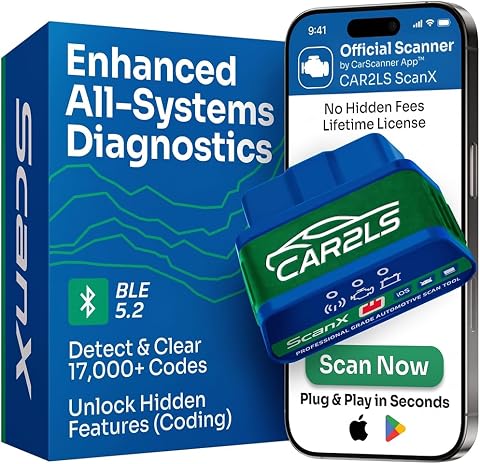
CAR2LS ScanX Bluetooth OBD2 Scanner with Full-System Diagnostics
- ✔ Connectivity: Bluetooth 5.2
- ✔ Compatible devices: iPhone and Android
- ✔ Vehicle compatibility: Most U.S. OBD2-compliant cars and light trucks from 2000 onward

IDUTEX TS710 Heavy-Duty Truck Scanner with DPF Regeneration and Bidirectional Tests
- ✔ Screen: 7-inch HD touchscreen
- ✔ Battery: 5000 mAh
- ✔ Storage: 32 GB
Difficulty: Beginner | Time: 15-30 minutes
What You’ll Need
Tools & Materials:
- OBD-II scanner compatible with your vehicle
- Vehicle owner’s manual
- Phone or notebook for recording codes
- Flashlight if the connector area is dim
Knowledge:
- How to locate the driver’s seat, ignition, and dashboard controls
- How to read the scanner’s screen or its companion app
Most gasoline cars and light trucks sold in the United States from model year 1996 onward use OBD-II. Other regions and vehicle types may follow different dates or standards. Check the scanner’s compatibility list and your manual before connecting. A basic scanner can read emissions-related codes, but it may not access manufacturer-specific systems such as ABS, airbags, or transmission controls.
OBDeleven 3 Bluetooth OBD2 Diagnostic Tool for Android and iOS
The OBDeleven 3 is our top pick for drivers who want more than a basic engine-code reader and own a supported vehicle. It pairs with the mobile app over Bluetooth to read and clear faults and monitor live OBD2 data. Where it separates itself from the ScanX is in its stated advanced diagnostics and coding for supported Volkswagen Group, BMW Group, Mercedes-Benz, Toyota Group, and U.S.-made Ford vehicles. That makes it a stronger match for owners who want to investigate supported systems or explore vehicle customizations.Its strength depends on matching the tool to the car. Most other compatible vehicles receive basic engine and transmission diagnostics, and the maker notes that most pre-approximately-2008 vehicles are not supported. Manual coding and adaptations require a PRO or ULTIMATE plan, while One-Click Apps use in-app Credits, so the capabilities described do not all come with the same access. Unlike the ScanX, this pick emphasizes brand-specific depth over a broad, general-purpose system list. Choose it when your vehicle is explicitly supported and coding matters; consider the ScanX if your priority is a more broadly oriented app scanner.
Pros:
- Reads and clears codes and monitors live data through a phone app.
- Offers advanced diagnostics and coding for specified supported brands.
- Bluetooth connection avoids a dedicated handheld screen.
- One account can be used with multiple vehicles without a vehicle limit.
Cons:
- Manual coding and adaptations require a PRO or ULTIMATE plan.
- One-Click Apps require in-app Credits.
- Vehicle compatibility and available functions vary.
Best for: Owners of supported Volkswagen Group, BMW Group, Mercedes-Benz, Toyota Group, or U.S.-made Ford vehicles who want app-based diagnostics and may use brand-specific coding.
Not ideal for: Drivers with an unsupported or older vehicle, or anyone expecting all coding and customization features without a paid plan or Credits.
Bottom line: For a supported vehicle, OBDeleven 3 offers the strongest blend of routine scanning and brand-specific depth in this car-focused lineup, with paid access requirements to factor in.
“For a supported vehicle, OBDeleven 3 offers the strongest blend of routine scanning and brand-specific depth in this car-focused lineup, with paid access requirements to factor in.”
CAR2LS ScanX Bluetooth OBD2 Scanner with Full-System Diagnostics
The CAR2LS ScanX makes the most sense for car owners who want to look beyond engine trouble codes without moving to a dedicated handheld unit. Through Bluetooth 5.2, it connects to iPhone and Android devices for code reading and clearing, live data, sensor readings, freeze-frame information, and graphs. Its supported coverage can include engine, ABS, airbag, and transmission systems, giving it a broader general-car role than the OBDeleven 3 has on vehicles that only receive that tool’s basic diagnostics.Included lifetime CarScanner access without a subscription is a practical distinction: buyers can use the scanner with that app access rather than budgeting around an ongoing app subscription. The tradeoff is that “full-system” does not mean every module or service feature works on every car. Enhanced diagnostics, customization, and service functions depend on make, model, and year; most coding functions require a 2012-or-newer vehicle. Compared with the OBDeleven, the ScanX is less centered on named-brand coding depth. It is a better fit when supported multi-system coverage and app-based data are the main goals, but truck operators should look to the TS710 instead.
Pros:
- Accesses multiple supported systems, including ABS, airbag, and transmission.
- Shows live data, sensor readings, freeze-frame information, and graphs.
- Includes lifetime CarScanner access without a subscription.
- Supports service functions and customization on compatible vehicles.
Cons:
- Enhanced diagnostics and service functions depend on the vehicle.
- Most coding functions require a 2012-or-newer vehicle.
- A compatible phone is needed for operation.
Best for: Drivers with a compatible U.S. OBD2-compliant car or light truck who want app-based access to supported systems beyond the engine.
Not ideal for: Buyers who need guaranteed access to every system or coding function, or a dedicated scanner built around heavy-duty truck protocols and adapters.
Bottom line: ScanX is the broadest general phone-based car option here, provided its supported systems and functions match the vehicle in question.
“ScanX is the broadest general phone-based car option here, provided its supported systems and functions match the vehicle in question.”
IDUTEX TS710 Heavy-Duty Truck Scanner with DPF Regeneration and Bidirectional Tests
The IDUTEX TS710 is a specialized choice for buyers whose diagnostic work centers on supported heavy-duty trucks. Unlike the two Bluetooth options, it is a standalone handheld scanner with a 7-inch touchscreen, a rechargeable battery, and a set of vehicle-specific adapters. Its J1939 and J1708/J1587 support helps explain why it belongs in this roundup: it is designed for a different vehicle and service context from a phone-based car scanner.Across supported systems it reads codes and live data, and it adds service functions, bidirectional tests, selected ECU coding, and supported DPF regeneration. Those capabilities can be useful for a truck owner or service professional who needs more than a passenger-car code check. The limits matter: functions vary with vehicle, year, engine, and ECU, and a DPF regeneration depends on operating conditions and does not fix every DPF fault. Two years of Wi-Fi updates are included; buyers should also account for the stated option to renew updates afterward. For ordinary car diagnostics, the ScanX is the more natural fit; choose the TS710 when its truck coverage and service functions are relevant to the vehicles being maintained.
Pros:
- Reads codes and live data across supported vehicle systems.
- Provides supported DPF regeneration, bidirectional tests, and more than 42 service functions.
- Includes a touchscreen, carrying case, cables, and multiple adapters.
- Supports J1939 and J1708/J1587 protocols.
Cons:
- Diagnostic and service functions vary by vehicle, year, engine, and ECU.
- DPF regeneration depends on operating conditions and does not resolve every DPF fault.
- ECU coding is available only for selected vehicles and modules.
Best for: Truck owners or technicians who need a dedicated handheld scanner, truck adapters, and supported heavy-duty service functions.
Not ideal for: Drivers seeking a compact phone-based scanner for routine passenger-car diagnostics or buyers whose exact truck and ECU are not confirmed as supported.
Bottom line: For supported heavy-duty trucks, TS710 brings the dedicated hardware and service functions the car-focused Bluetooth picks do not target, but its fit is specialized.
“For supported heavy-duty trucks, TS710 brings the dedicated hardware and service functions the car-focused Bluetooth picks do not target, but its fit is specialized.”
As an Amazon Associate we earn from qualifying purchases.
Before You Start
Park on level ground, apply the parking brake, and switch off accessories such as the headlights and climate control. Keep clear of moving parts. Do not use a scanner while driving. A trouble code identifies a system or condition the vehicle detected; it does not prove that a particular part has failed. Record the code before clearing anything, and do not clear codes just to turn off a warning light.
Step-by-Step Instructions
Step 1: Check scanner compatibility
Compare the scanner’s supported vehicle list with your car’s make, model, year, and engine. Check whether it connects directly or uses a phone app, and install or update the app before going to the vehicle if needed. Find out whether the scanner reads only standard engine codes or also supports the system you want to check.
Tip: A generic OBD-II reader may not display codes from every vehicle system. Use a scanner that specifically lists ABS, airbag, or other system support if that is your goal.
Check: The scanner documentation lists your vehicle or confirms support for its model year and the systems you plan to scan.
Step 2: Locate the diagnostic connector
Look under the dashboard on the driver’s side for the OBD-II connector, a trapezoid-shaped socket with 16 pin positions. Check near the steering column, lower dashboard, or center console. Consult the owner’s manual if it is not visible. Do not force the scanner into a socket that does not match its plug.
Tip: Use a flashlight and look for a plastic cover. The connector may sit above or behind a lower trim panel, but it should be accessible without removing parts.
Check: You have found a 16-pin socket that matches the scanner’s plug and is not visibly damaged.
Step 3: Prepare the vehicle and scanner
Park safely, set the parking brake, and switch off the engine and accessories. Read the scanner’s quick-start instructions. If the scanner uses a phone app, turn on the phone’s Bluetooth or Wi-Fi as the instructions specify, and allow the app to connect to the scanner.
Tip: Keep the vehicle in Park, or in Neutral with the parking brake set for a manual transmission. Follow the vehicle manual if it gives a different procedure for diagnostic work.
Check: The vehicle is stationary, the scanner is ready, and any required app connection is set up.
Step 4: Connect the scanner
Align the scanner plug with the diagnostic connector and push it in gently until seated. Do not twist or force it. If the scanner has a separate cable, connect it according to its instructions. Check that the scanner powers on; some models draw power from the vehicle, while others need a charged battery.
Tip: If the plug does not fit smoothly, stop and check its orientation and the connector type. Forcing it can damage the pins.
Check: The scanner powers on or shows a connection prompt, and the plug remains seated.
Step 5: Switch on the ignition
Turn the ignition to the ON position without starting the engine, unless the scanner or vehicle instructions specify otherwise. For a push-button start, press the button without pressing the brake or clutch to turn on the vehicle’s electronics. Wait for the dashboard lights to appear, then choose the vehicle or automatic identification option on the scanner.
Tip: The engine usually stays off for reading stored codes. Some live data or tests may require the engine to run; follow the scanner prompts and keep the vehicle parked.
Check: The scanner identifies the vehicle or displays its main diagnostic menu.
Step 6: Read and record the codes
Select a function such as Read Codes, Diagnostics, or Trouble Codes. Wait for the scan to finish. Record each code exactly, including its letter and digits, and note the scanner’s description, status, and whether it is pending, stored, or permanent. Take a photo of the screen if that is easier. Also note which warning lights are on and when they appeared.
Tip: Do not rely on a short code description alone. The same code can have multiple possible causes, and the displayed text may be generic.
Check: You have a legible record of every displayed code and its status, or the scanner reports that no codes are stored.
Step 7: Review basic vehicle information
If available, open the scanner’s Readiness or Vehicle Information menu and record the results. Readiness monitors show whether the vehicle’s self-checks have completed; they do not confirm that every part is working correctly. If you need live data, select only the readings relevant to the code and follow the scanner’s prompts.
Tip: Readiness monitors may show Incomplete after a battery replacement or code clearing. Avoid running special tests unless you understand the instructions and conditions they require.
Check: You have saved any useful readiness results or live readings with their displayed units and conditions.
Step 8: Look up the code and choose a next action
Use the owner’s manual, a trusted repair reference, or a qualified technician to interpret each code for your exact vehicle. Compare the code with the symptoms and any recent repairs or refueling. Follow the diagnostic checks for that vehicle before buying parts or attempting a repair.
Tip: Treat a code as a clue about a detected condition, not a parts-replacement instruction. If the warning light is flashing, the vehicle runs roughly, overheats, or loses power, stop driving when safe and arrange professional help.
Check: You have a code record and a sensible next step, such as monitoring a minor issue, checking a documented item, or contacting a repair shop.
Step 9: Disconnect and store the scanner
Turn the ignition off and wait for the scanner to finish any active operation. Unplug it by holding the connector body, not by pulling a cable. Close the app if used, and store the scanner and your code notes together. Leave the codes uncleared unless a repair procedure calls for clearing them.
Tip: Some vehicles remain electronically active briefly after shutdown. Waiting a short moment before unplugging can help the vehicle and scanner end communication cleanly.
Check: The scanner is removed without strain, the ignition is off, and your recorded results are available for follow-up.
Common Mistakes to Avoid
- Buying a scanner that does not support the vehicle or system. — Check compatibility for the vehicle’s year, make, and model, and confirm support for ABS or other non-engine systems if needed.
- Forcing the scanner plug into the connector. — Match the plug orientation and socket shape, then insert it gently. Stop if it does not fit.
- Clearing codes before recording them or diagnosing the cause. — Write down codes and status first. Clearing codes can remove useful information and reset readiness monitors.
- Replacing a part based only on the scanner’s code description. — Use vehicle-specific diagnostic information and check related wiring, connections, and symptoms before deciding on a repair.
Troubleshooting
Problem: The scanner does not power on.
Solution: Check that the plug is fully seated and the ignition is in the required position. If it still has no power, consult the manual for the vehicle’s diagnostic connector fuse and scanner power requirements.
Problem: The scanner powers on but cannot communicate with the vehicle.
Solution: Confirm the scanner supports the vehicle and that the ignition is ON. Unplug it, wait a few seconds, reconnect it, and retry. If the issue continues, check for a damaged connector or ask a repair shop to scan the vehicle.
Problem: No codes appear, but a warning light is on.
Solution: Check that you selected the correct system and that the scanner supports it. A basic engine-code reader may not access ABS, airbag, or manufacturer-specific modules. Seek a compatible scan or professional diagnosis.
Problem: The app cannot connect to a wireless scanner.
Solution: Check the scanner’s instructions for whether it uses Bluetooth or Wi-Fi, enable the required phone setting, and select the correct device in the app. Close other apps that may be using the scanner connection, then retry.
What Success Looks Like
You have completed the scan when the scanner has communicated with the vehicle, displayed the available codes or reported none, and you have recorded the exact codes and their statuses. You should also know which systems the scanner could access and have a reasonable next action based on the vehicle’s symptoms and a vehicle-specific reference. A successful scan does not by itself confirm a repair.
Next Steps
Keep the code record with the date, mileage, warning lights, and symptoms. If you arrange a repair, share those details with the technician. After a repair, follow the repair instructions for clearing codes and rescanning; some readiness checks need normal driving conditions and time to complete. If symptoms worsen or a warning light flashes, stop driving when safe and seek professional assistance.
Frequently Asked Questions
Can I use a scanner while the engine is running?
Read stored codes with the ignition on and engine off unless the scanner requests otherwise. Some live data checks require the engine to run; keep the vehicle parked, follow the prompts, and stay clear of moving parts.
Will a basic scanner read ABS or airbag codes?
Often it will not. Many basic readers access standard emissions-related engine codes only. Check the scanner’s system coverage for your vehicle before relying on it for ABS, airbag, or other modules.
Should I clear the code after reading it?
Not before recording and diagnosing it. Clearing can erase useful status information and reset readiness monitors. Clear codes only as part of an appropriate repair or diagnostic procedure.
Does a trouble code tell me which part to replace?
No. A code points to a detected condition or circuit and can have several causes. Use vehicle-specific diagnostic steps to find the cause before replacing parts.
What should I do if the scanner finds no codes?
Record that result and check whether the scanner accessed the system linked to the warning light. Some lights involve modules a basic scanner cannot read, and some problems do not store a code. Get a suitable scan or professional diagnosis if the warning or symptoms continue.